 If you manage a nonprofit organization and are looking to make your advertising budget stretch further, please read on. The Google Grants program enables nonprofits to get the word out about the wonderful things they’re doing through Google AdWords advertising.
About Google AdWords
Google AdWords is Google’s advertising platform. You can see an example of Google ads below (in this case for the keyword phrase/search term “donation AIDS”):
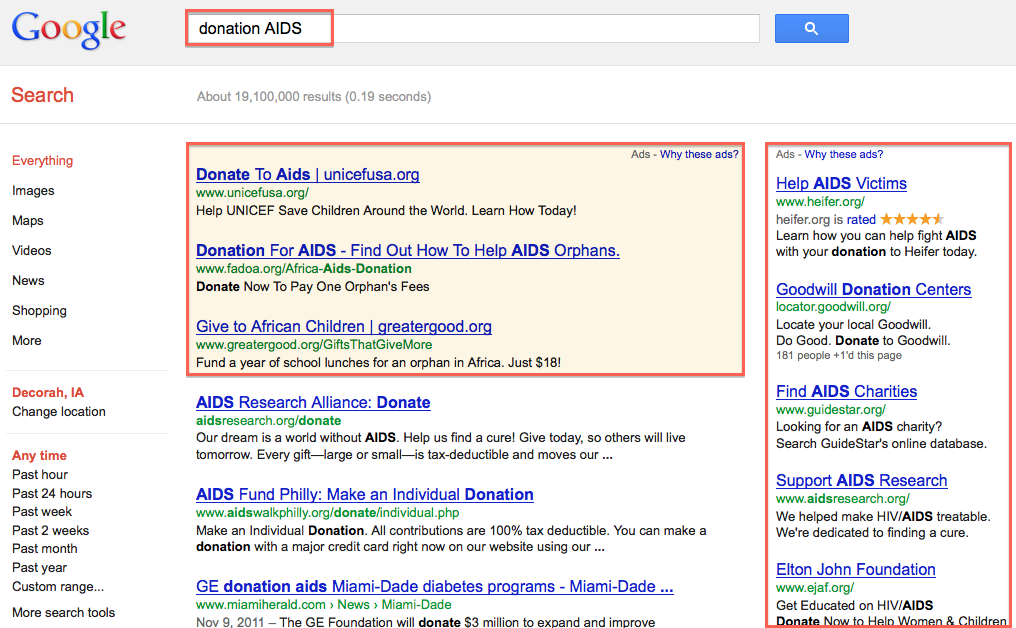
Google AdWords is a great way to get visibility in search results while you work on ranking in the organic search (based on relevance, not paid ads). And even if you do rank well in organic search results, you will get the most clicks if you are visible both in the paid and organic search results.
About Google Grants
Google Grants allow nonprofits to run ads for FREE! There is no expiration date and no need to re-apply after a certain amount of time.
Currently, over 6,000 nonprofit organizations in the US (this program is for US-based organization only) benefit from Google Grants.
Organizations that receive a Google Grant are awarded an in-kind online advertising account which can be used it in a variety of ways, including general outreach, fundraising activities, and recruitment of volunteers. ~Google Grants
The eligibility requirements are described here and includes the following:
- Hold current 501(c)(3) status, as determined by the U.S. Internal Revenue Service; and
- Acknowledge and agree to the application’s required certifications regarding nondiscrimination and donation receipt and use.
According to the website, the following organizations are not eligible for Google for Nonprofits (i.e. Google Grants):
- Governmental entities and organizations;
- Hospitals and health care organizations;
- Schools, childcare centers, academic institutions, and universities (philanthropic arms of educational organizations are eligible). To learn more about Google’s programs for educational institutions, visit Google in Education.
How to Apply for Google Grants
After you’ve verified that you’ve met the criteria for Google Grants, sign in to Google using your organization’s Google Account (make sure it’s not your individual account).
Go to the Google for Nonprofits application page and follow the steps to fill out the application.
According to Google, it may take up to five months to find out if your application has been approved.
Getting Started with AdWords
There is a bit of a learning curve when first starting out with AdWords. However, Google provides lots of great training materials and there are other good resources online.
The key things to note when starting with AdWords are the following:
- You can run one or more advertising campaigns. Your budget is tied to your campaign. Your target market/language is also defined at the campaign level.
- A campaign generally covers a specific product/service/goal. For example, if you want more volunteers and more donations, you would have two different campaigns for the two goals.
- Campaigns consist of one or more ad groups.
- Each ad group has one or more keywords (or keyword phrases) and ads associated with it. The keywords determine which search queries should trigger the ads.
- The position of an ad is based on CPC (cost per click) budget and quality score.
- The quality score is partially a mystery, but some known things that impact it are the relevance of the keyword to the ad and the ad to the landing page on your website. It also depends on your advertising history.
- You can use the Keyword Tool to research keywords (you can find it in the “Tools and Analysis” section of AdWords).
- It’s good to try multiple ads and keywords to see what works well.
- You can connect Google AdWords to Google Analytics to view the results of your advertising campaign in one place.
We really do hope you take advantage of this opportunity. The reach of Google AdWords is vast and participating nonprofits have seen great results from using this program.