Here at Web Gnomes, we stay on top of the ever-changing world of Internet Marketing so you don’t have to. We enjoy learning new tricks of the trade and putting them to practice in the work that we do for our esteemed clients. Here is some of the most helpful Internet marketing info we came across this week:
Have You Set up Timeline on Your Facebook ‘Page’ Yet?
This short and sweet post from ProBlogger’s Darren Rowse is a reminder to those of you out there who have Facebook pages to set up your page with the new design.
Even though the post is short, it gave me several great ideas. Specifically, it prompted me to add the YouTube for Pages app so we can make our Gnome Tips available to our Facebook fans and also to add a link to our website in the “About” section of the Facebook page.
Check out the comments for links to other newly-updated Facebook pages.
Bing Webmaster Tools Gets Organic Keyword Research Tool, API
When we start a new project, we always make sure to set up an account in Bing Webmaster Tools. This week, we found out that Bing has added a keyword research tool to Webmaster Tools. This is quite exciting! Thanks Chris Crum for giving those of us who couldn’t make it to SMX West the lowdown in this article!
Here’s a screenshot of the new Bing keyword tool:
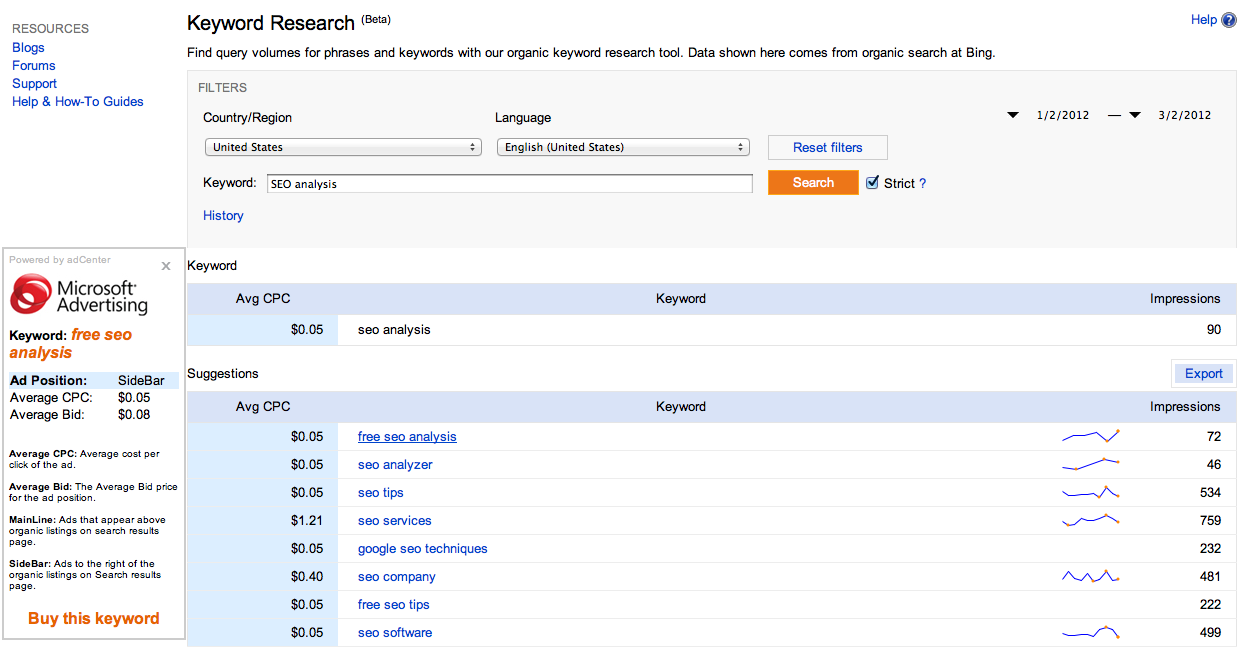
As you can see, it allows you to select country and language and search for a keyword phrase. It also allows you to narrow down to “strict” (or exact match). The results provide average cost-per-click (CPC), trend, and impressions.
11 Google Analytics Tricks to Use for Your Website
There are always new tricks to learn as it relates to Google Analytics. Google Analytics is a free service from Google that allows you to track the visitor activity on your website and how it impacts your business.
Eugen Oprea writes in great detail (but accessibly!) about different ways to use Google Analytics to learn more about your website. They are:
- Setup Goals (Absolutely!)
- Connect Your Google Webmaster Tools Account (Gnome Tips: Learn how)
- Enable Site Speed
- Enable Site Search
- Track Events (I love this one!)
- Real-Time Reporting
- Multi-Channel Funnels
- Use Campaign Tracking
- Plot Rows
- Custom Dashboards
- Flow Visualization (Another cool one!)
To learn how to do any of these tricks, check out the full article.
Bonus! Guest Blogging Strategies – Whiteboard Friday
There were so many exciting things happening and great content created this week, and I just had to include this Whiteboard Friday from SEOmoz! Rand has done it again. In this video, he walks the audience through the process of guest posting in a step-by-step manner:
- Find Good Targets
- Build Relationships
- Optimize Your Content for Their Audience
- Earn Outsized Returns from Guest Post Content (Additional Tips)
To learn more about this process, watch the video!
Happy Friday and enjoy your weekend!